RSS Feed c9 logo Australia's best motorcycle shop retail software
Release 4.615 March 11, 2016 barney

This version fixes a very serious bug.  The bug can result in all transactions done within a session of c9 to be lost.

Cause:  system errors in c9, such as insufficient memory error while doing massive workloads like importing parts/fiche images, can put c9 in such a state that all operations done afterwards are not correctly saved. Normally, when confronted with such errors, users will shutdown the system and retry. But if you continue to try and use c9 after such an error, there is a chance, based on the type of system error and when it occurred, that none of the work done from that point onwards will be saved.

Further, c9 has some tests for this situation to check and warn user that this has happened.  But they are only implemented in point of sale screen. So if you have system crash, never use point of sale on that c9 session, and do other things, like sell units, you will never notice.

The conditions required to make this bug occur are exceedingly rare, but the severity of the issue deserves it's own version of c9 to deal with it.

Fix introduced:

  • Check integrity of c9 database everytime a new operation is started. (Only works in new UI mode, old school user interface does not have this check. We will be removing old school soon)
  • Also check integrity at a couple of key points. Start unit sale, select job, perform some sort of modification on a job.
  • In event of integrity check failure
    • Tweak recovery option to work a little more smoothly.
    • Force c9/Java to shutdown
Setting up PC-EFTPOS March 9, 2016 barney

Following describes how to get PC-EFTPOS integrated into c9.

Assumes you have had people setup PC-EFTPOS and verified it is working via PC-EFTPOS client control panel thingo and that you have docket printers working on c9.

Setting up on same computer where PC-EFTPOS gear is plugged in.

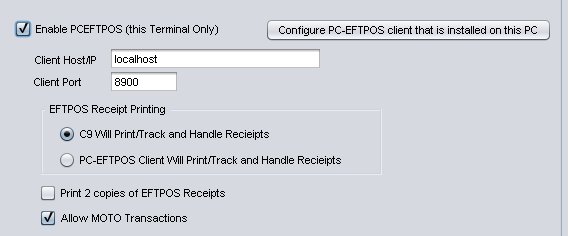
Setup -> Main Setup Screen -> EFTPOS / Paypal

pceftpos_1

  • Click Enabled PCEFTPOS
  • Leave Client Host/PORT exactly as it is. Do not change these
  • Click on button : Configure PC-EFTPOS client that is installed on this PC.
    • This is only done on the computer where the equipment is physically installed
    • Computer needs to be rebooted after this change for it to have any effect
    • Sometimes this step does not work.  It is trying to insert registry keys to change behaviour of PC-EFTPOS and often c9 will be running with a permission level that disallows it from making such changes. PC-EFTPOS should make these configuration/dialog options, but for some unexplained reason they do not, it is them that make this process unnecessarily hard, not c9 🙁 . The registry keys your local IT support people might need to add are:

32bit Windows
Key: HKEY_LOCAL_MACHINE\Software\CullenSoftwareDesign\EFTCLIENT\CLIENT
SubKey: IP_INTERFACE_PORT
Value: 8900 decimal (22c4 Hex) DWORD

64bit Windows
Key: HKEY_LOCAL_MACHINE\Software\Wow6432Node\CullenSoftwareDesign\EFTCLIENT\CLIENT
SubKey: IP_INTERFACE_PORT
Value: 8900 decimal (22c4 Hex) DWORD

  • Configure receipt printing way you want.
  • If you want to enable MOTO : click on Allow MOTO option. Especially useful if you are processing web orders.

Next, you need to tell c9 which payment instrument triggers PC-EFTPOS.  In Payments section, tick 'E' for EFTPOS integration for the correct option

pceftpos_2

Thats it. Now when you do a sale with eftpos you will see eftpos sync screen, like this in c9:

pceftpos_3


Setting up on different computer to where PC-EFTPOS gear is plugged in.

This step needs local IT hardware/network support.

  • On computer with PC-EFTPOS Gear:
    • Make sure it has a static IP address
    • Configure firewall to allow traffic in on port 8900
  • On remote computer. in c9
    • Setup -> Main Setup Screen -> EFTPOS / Paypal
      • Click Enabled PCEFTPOS
      • Change IP address to IP address/hostname of computer with the equipment installed
      • Configure receipt print settings as desired


Release 4.614 March 8, 2016 barney

More issues with systems integration into KTM/Husky. 🙁

Public KTM/Husky sites now broken. You will notice if you click back button on browser and click on a different diagram, it loads the diagram you where previously looking at; making it an even more painful and useless website to use.  Spent ages trying to workaround/ understand this brain damage but unable to and cannot figure out why, so I am disabling it as too unreliable to be used as a data source for fetching fiche diagrams.

For the login based dealernet websites: I've modified code slightly to try and decode bike names a little better. It is difficult, because names are written differently, sometimes for example you'll have year and country code in <>, but other times it is embedded in the model name itself. It looks like it was hand typed (by a trained monkey?), instead of computer generated from discrete database fields, so parsing/decoding important information such as year and country is now alot harder and reliable results cannot be as readily guaranteed. Using this data is far from ideal, but it is all that there is now. Consider this one: is it 2012 or 2013?

125 DUKE COLOR 1 ABS 2012 <2013> <8003M4>


Cross fingers and hope that brain damage on public parts sites doesn't spread to the login only sites.


Release 4.613 March 4, 2016 barney

Includes database changes, you'll need to log all terminals out during upgrade

  • Bugfixes
    • Spares - Move parts intelligently. Broken with recent changes to suppliers. Now working again
    • Receive spares - new feature to quickly tag a part on backorder did not refresh invoice total figures. Now fixed
    • Vouchers - notes on voucher would only save a very tiny amount of the notes, clipping rest of the text. Now fixed
    • Import fiche - sometimes would crash, especially if you select Abort.  Should now be more robust
    • Unit deal.  System could not handle selling same part to different units on a deal. Now fixed.
  • Workshop
    • Warn user if they are re-printing job card. Track # of job cards printed. Print a huge letter on the job card based on print number. i.e. [A], [B], [C] .... etc
      jc
Release 4.612 March 2, 2016 barney

Recent removal of partsmagician removed ability to do a F12 query on KTM.

KTM query was actually implemented in Parts magician : so disabling parts magician disabled KTM query.

KTM query now moved into c9. Does not impact Husqvarana as Husky use new Husky website to check availability.

pmmedParts magician, which has been running since June 2003 will be shutdown this week.  Over past 13 years it has processed close to 2 million requests and replies.

Moving forward, there will be now a c9 only implementation of parts magician. The new systems look exactly the same from a c9 operations perspective: but uses different technology.

Benefits:

  • Faster. Results are now instantaneous.
  • Guaranteed results: no longer dependent on whether or not c9 messenger is working in the target dealership, that the database is online etc.
  • More accurate dealership information.
  • Conceptually simpler technology, easier for us at c9 to grow and maintain

Consequences:

  • Is a c9 only solution. Old parts magician clients will no longer work
  • Any c9 dealer ( from version 4.611 onwards) can make queries, but only dealers that have online backup will reply to queries. If you don't have online backup, there are many reasons why you should have it. This is one more.


Release 4.611 March 1, 2016 barney

Parts magician completely removed and replaced with a c9 based alternative.  After upgrading, following differences:

  • Magician queries, faster and more reliable and will always return a result irrespective of status of other dealers computer setup
  • View supplier details more accurate
  • No non-c9 based solution anymore.  Will only query dealers with online backup (which is most dealers anyway).

Workshop booking reminders. With multiple c9 messengers running over multiple days a-piece, system could send duplicate notifications as messenger did not properly check if another messenger had already done this task.


Release 4.610 February 29, 2016 barney

Includes DB changes, you'll need to log all terminals out during upgrade

  • Spares
    • Option to print all notes on a invoice, including notes on related quotes/orders etc. On by default but can be switched off in setup
    • Spares complete, F5=Notes. Allow user to view/modify all historical related notes as well as note to be created on new invoice/quote
    • View Received order : display totals,freight etc on screen
    • Fiche : optimised database calls on substitute parts functionality
    • Parts Magician : provide operator feedback on progress of supplier query. Previously was not sure if query was in progress or finished but failed to return as result. Now more obvious
    • Parts Magician : bug in c9 meant for newly magicianed suppliers c9 would not automatically kick off login screen. User had to click on 'dealer login' to initiate process. Now fixed
    • F12 pickup order : colour code invoice based on status of parts on order overall
    • Export order: added new method type for Softway (used by MV Agusta)
  • Miner
    • Allow query of Biz Activity from Customer. Useful for doing an activity dump on a given customer.
Release 4.609 February 24, 2016 barney
  • Spares
    • Fiche Import
      • Convert extended latin encoding into ASCII, i.e. from [125 EXC M/Ö (US)] to [125 EXC M/O (US)] on import.  C9 itself can handle extended charsets, but it's database and backup database is configured such that it cannot.
      • Support importing from publicly accessible KTM and Husky parts fiche sites
      • Manage fiche : option to allow you to substitute parts based on part number. i.e. you are a Husky dealer and want to list KTM diagrams but substitute Husky part numbers on those diagrams where possible.
    • Magician
      • Added support for Polaris (will integrate into web
  • Workshop
    • Bug fix with modify job : new P/L tallies where obscuring other things on the job screen, like grand total
Release 4.608 February 23, 2016 barney
  • Spares
    • SMS notification bugfix, selected SMS notify option in point of sale complete was no longer working. Would go to default behaviour. Now fixed
    • Point of Sale complete,  some on screen redesign work to hopefully make function of freight to charge later more intuitive.
    • Export generic order. Support exporting format for Polaris.
    • Print labels, was not coping with label printers with long printer names. Now fixed
    • PC-EFTPOS, setup PC-EFTPOS button would not work for 64bit computers. Now fixed
    • Import price file, deal with a NLA marker appearing in supercession field by clearing supercession and adding 'NLS' to front of part description.  Cope with suppliers (like triumph importer and a few others) who think it is okay to arbitrarily change the definition of things and throw any old thing into the supercession field. By default will match on 'NLA', 'NA' and 'NLS' but can be configured globally in Setup or disabled by setting it to a blank string.
    • Magician Query
      • Added: MCS Online
      • Added: Triumph
    • Receive order
      • added toggle buttons to allow rapid flagging of full backorder/cancelled items. Saves having to go into modify screen set qty and unsupply behaviour. Hopefully means orders can be processed a bit faster.
      • Do not reset order supplier not none if order contains parts tagged from multiple suppliers. i.e. when sourcing accessory items from another dealership.
    • Print order
      • Allow user to modify order header notes in select options screen
      • When print notes are selected, keep print orientation in portrait mode, only flip to landscape if any of these options alone are selected : qoh, cost, extension, location
    • Part Image/Fiche Import
      • Minor tweaks to BRP to improve robustness of import
      • Minor tweaks to Ducati importer to improve robustness
      • Got KTM/Husky Spare Parts web import working again
  • Workshop
    • P/L tab on view and modify job: Show totals.
    • P/L tab on view and modify job: discount shown was GST Inc, needs to be GST ex.
  •  Business
    • Reprint deposit. Ability to only show deposits connected to a selected customer.
  •  Miner
    • Allow query on created date on a contact/customer
« Previous PageNext Page »