RSS Feed c9 logo Australia's best motorcycle shop retail software
Release 5.2.157 May 25, 2026 barney

Includes DB changes. You need to close and reopen c9

Important Change - messenger

This version of c9 enforces 'restrict messenger' mode so that messenger only runs on computers which are explicitly configured to run it

Some dealers might have c9 in permissive mode and will find messenger will not start at all. To fix on main computer goto setup -> main setup screen -> system and database tab. Make sure 'allow' option indicated below is selected, save then close and reopen c9

Basic fixes / tweaks

  • Payday super / payroll
    • Rename superfund ID so it is obvious this is USI
    • Allow member ID to be blank if SMSF
    • Select superfund : filter out superfund records which do not accept contribution.
    • Fix a  serious issue when there are multiple messengers running and they both try to progress a payday super operation can trigger undefined behaviour upstream. Make sure super records are locked so there is no simultaneous activity. Also escalated to our upstream supplier.
    • when there is a network/connectivity error with our pay provider c9 is supposed to generate an detailed diagnostic trace. Wasn't there. Added in this version
  • Edit Sale unit  : show vin and engine number onscreen

Complex tweaks / fixes

  • New lock fixes : subtle bug with locking in some rare circumstances would trigger a shutdown of c9. example, point of sale 2 parts: 1 uom sale + other order on a daily order that doesn't exist yet. Put on reserve/pickup will fail because of UOM item. A minute later c9 will crash. Root cause is because lock for daily order is done in a txn frame which is then rolled back. Fix : all locks happen in autocommit frames, if current frame isn't autocommit then establish a new temporary connection to database
  • potential performance issues with inputting a part in point of sale fixed. for a couple of dealers have had sporadic reports of certain parts taking a long time (5 to 20 seconds or more) to pull up and these problems seem to disappear after some database 'ANALYZE' tuning.  I suspect issue comes down to two  things. This version corrects one of them : how c9 handles 'use alt franchise' settings in advanced (2) tab of edit franchise. Previously this was implemented on database, but I suspect it is far more efficient and reliable to implement on client side. So moved logic here. Second area we will explore later if problems continue to happen after this update (relates to instantaneous computation of available partkit qtys in F2 and input part number ).
  • Backup Verification : a low level change happening here to progress a very long term project : allow c9 and c9 databases to work with extended UTF charcter sets.  Actual support for this is still a long time away, but this is a critical next step. Opportunity taken since we need to migrate our servers to be a better provider, might as well ensure new servers support UTF at same time
  • Bugfix for a very specific set of circumstances with add payment. If you add payment and preselect txns to pay via 'sel txns' and then adjust the payment figure downwards afterwards in some circumstances this can cause the txn to fail to save. Now fixed


Release 5.2.156 May 13, 2026 barney

Small tweak to cope with using barcode scanners via remote c9 where barcode is configured to transmit STX.

In point of sale screen the barcode would misread as '42' instead of actual barcode. This version includes a temporary fix that makes such scanners work.

One subtle variation between remote and local STX programmed barcodes is remotely for now , barcode scanner will behave as though it wasn't programmed. You'll need to manually key in qty sold in point of sale for example.

Important Sender ID changes

ACMA (Australian Communications and Media Authority) are mandating stricter controls over Sender IDs on SMS to minimise fraud and scams.

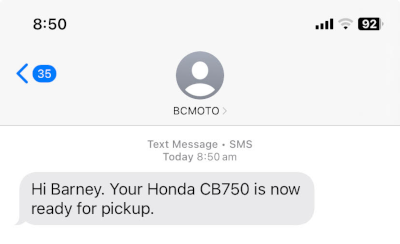
A SMS message like this has the sender listed as BCMOTO

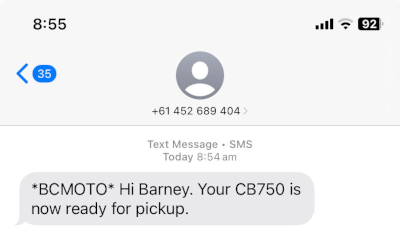
ACMA now require a much stricter process for getting their Sender ID into your SMS messages. If this process is not completed by July 1 your messages from July 1 will now look like this:

IF ACMA requirements are not done then the sender ID will no longer be transmitted , instead it will come from a 04 number controlled by us at C9 and the original Sender ID will not embed at the start of the message.

The new ACMA Process, High level

  1. Create an account on ACMA website linked to your ABN
  2. Part of above, prove you are the authorised contact / control of your ABN via mygov ID
  3. Sender ID you choose must reasonably be linked to name of your business
  4. ACMA will manually review request and approve it if all is appropriate

What to Do in c9

Step 1 - send request to register

Make sure you are running latest version of c9 (v5.2.155).

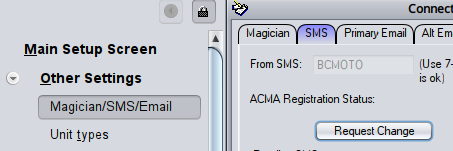
Then Goto setup -> other settings and pick Magician/SMS/Email. Goto SMS tab. Note the From SMS you can see there already (e.g. BCMOTO). Click Request Change button

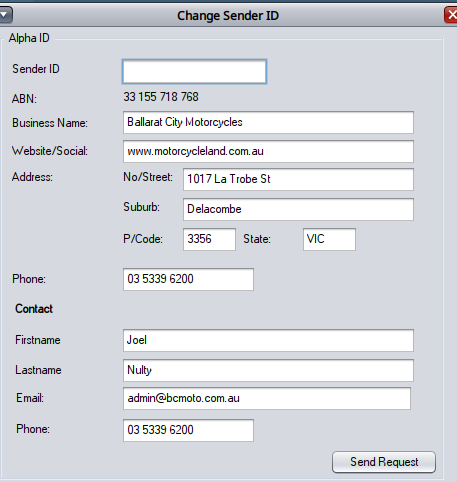
Retype the Sender ID you want. Ideally keep it the same as what is already there but make changes if you need. Review all details and make sure they are spot on.

Then click 'send Request' button

Step 2- wait for email from ACMA

The above will send c9 the request. We will review and submit to ACMA.  Once submitted to ACMA you will receive an email requesting approval for the Sender ID. Click on the link and follow instructions. You will need to create an account on ACMA website linked to supplied ABN. You may need to use a principal contact email linked to your ABN which may well be your accountant.

Once you are logged into ACMA you should be able to see a request for Sender ID sent from C9 Software and from there you can approve it.

Step 3 - finalisation

Once approved by you ACMA will review and approve / reject request.

End to end the whole process can be expected to take a few days to a week. Make sure you get on this early, especially as we expect a rush to sort this out, Australia wide closer to July 1.


Over the weekend Nuvei suffered yet another issue with integrated terminals.

C9 now recommends against using Nuvei terminals in integrated mode. Our assessment of the solution is that it is not fit for purpose. There are two major concerns driving our assessment.

Broadly the terminals themselves seem pretty comparable to other industry products in terms of the general fit for purpose. Also their online payment gateway for websites also is operationally fine. The recommendation against using Nuvei in store in integrated mode is because the mechanisms which allow c9 (and other point of sale systems) to interconnect and drive the transaction are highly problematic.

1. Reliability : the system suffers outages and has suffered them for some time.  Outages correlate strongly to times of high retail activity (e.g. Saturday mornings) and previously Nuvei disclosed to us past outages at least were caused by service load issues. That these problems continue to occur is a serious concern.

2. Accuracy : we have often encountered scenarios where the systems we connect to misreport the status of the transaction and show a different result in comparison to merchant portal. Several times we have queried Nuvei on this and we have not received any clarification. We suspect the system merely presents outcomes as known at time of txn and final transaction outcomes are not reconciled into or accessible to the systems they provide for interconnect.

To disable EFT integration globally.

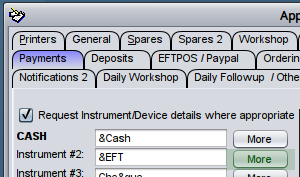
Setup -> Main setup screen -> Payments. Identify the payment method(s) linked to eftpos. Click more button

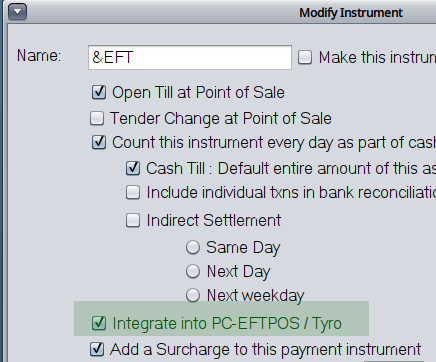
Uncheck option, Integrate into PC-EFTPOS/Tyro. Click Close then OK on prior screen


Release 5.2.155 May 8, 2026 barney

DB / Messenger Changes - You need to log all terminals out with this upgrade

Sender ID registration changes to support July 1 ACMA requirements. Details of this are very important but will be covered in another separate post shortly.

Tweaks and fixes

  • PayDay Super : Super fund MVR support added. Note this function isn't usable until July 1 but is now in play. MVR queries are accessed in edit staff screen
  • Magician checks
    • Mojo magician : fixed. You'll need a apikey though to use it. To get an API key goto mojo dealer portal. You need to use the old Basic api key; NOT the bearer token.
    • Honda magician and website interaction causing messenger to crash. Now fixed.
  • Other
    • Purchase unit : add similar unit. Broken in recent changes to c9. Now working again
    • Accounting reports : print biz name + ABN at top of these reports
    • Historical Analysis restock  / stock analysis tools : wasn't generating data or useful maxqty recommendations. Caused by recent changes to prepare for 5.3. (wasn't sorting results correctly from database before feeding into liner regression and linear regression expected to receive presorted data).